

The Groups list
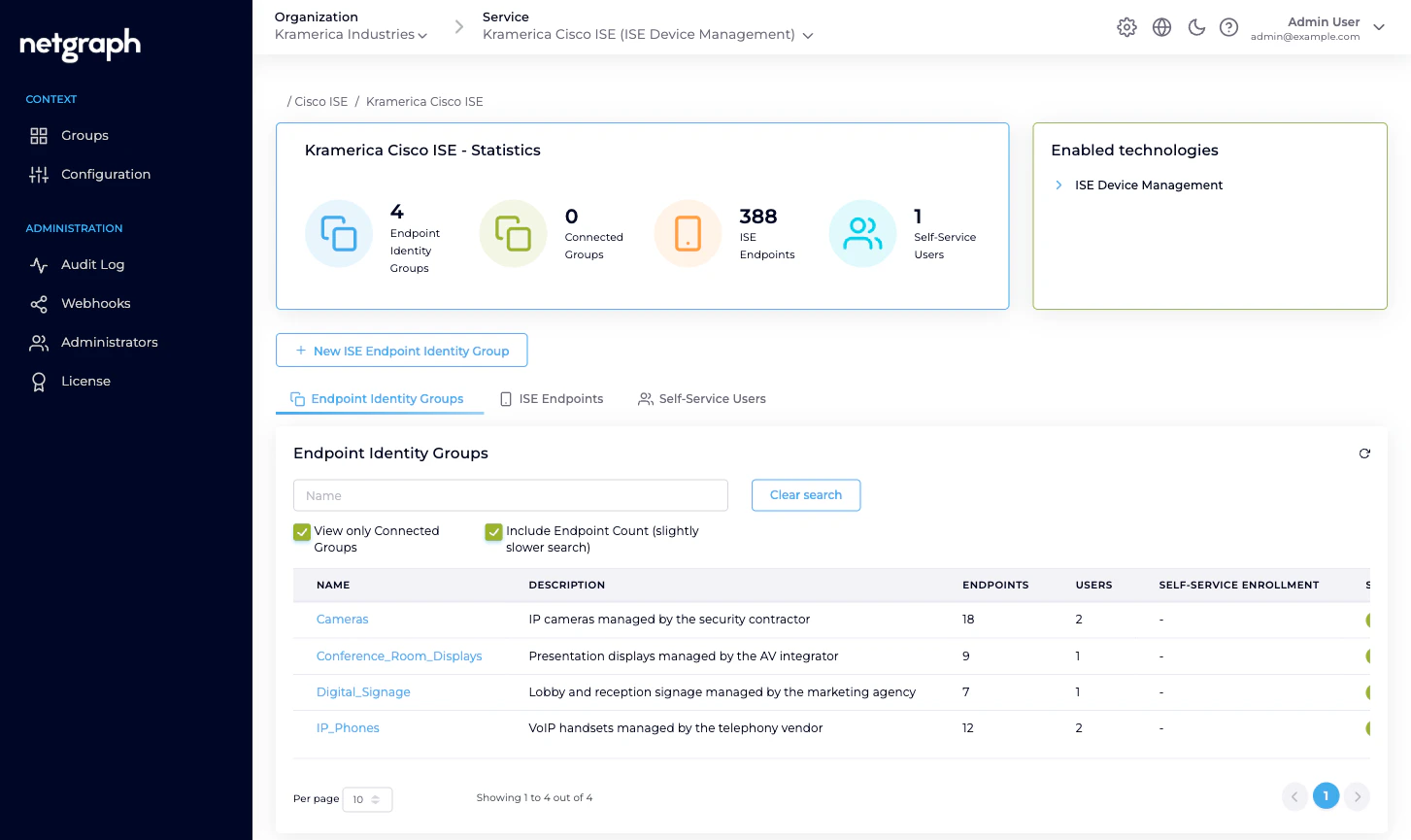
Open the Context and pick Groups in the left navigation. You land on the Context overview with the Endpoint Identity Groups tab selected. The list shows every Endpoint Identity Group in your Cisco ISE — not just the ones under managed administration. Columns:- Name — exactly what Cisco ISE reports.
- Description — the ISE-side description.
- Endpoints — how many endpoints ISE currently has in the group.
- Users — how many Self-Service Users are on the group (n/a if Not Connected).
- Self-Service Enrollment — whether auto-enrollment via SAML is turned on for the group (n/a if Not Connected).
- Status — Connected (managed) or Not Connected.
- Action — a row menu: Disconnect Group for connected groups, Connect this Group for those that aren’t.
- A Name search to filter.
- View only Connected Groups to hide the unmanaged ones.
- Include Endpoint Count — on by default; counts are slightly slower to fetch, so you can turn it off if the list is very large.
Connecting an existing ISE group
If the group already exists on the Cisco ISE side — a profile- driven group, a group someone set up manually, a group populated by an identity source — bring it under managed administration without duplicating it.
The group’s Status flips to Connected and the Users
and Self-Service Enrollment columns become writable. You
can now invite Self-Service Users, apply Custom Attribute
values, and delegate endpoint administration.
Creating a new group from the platform
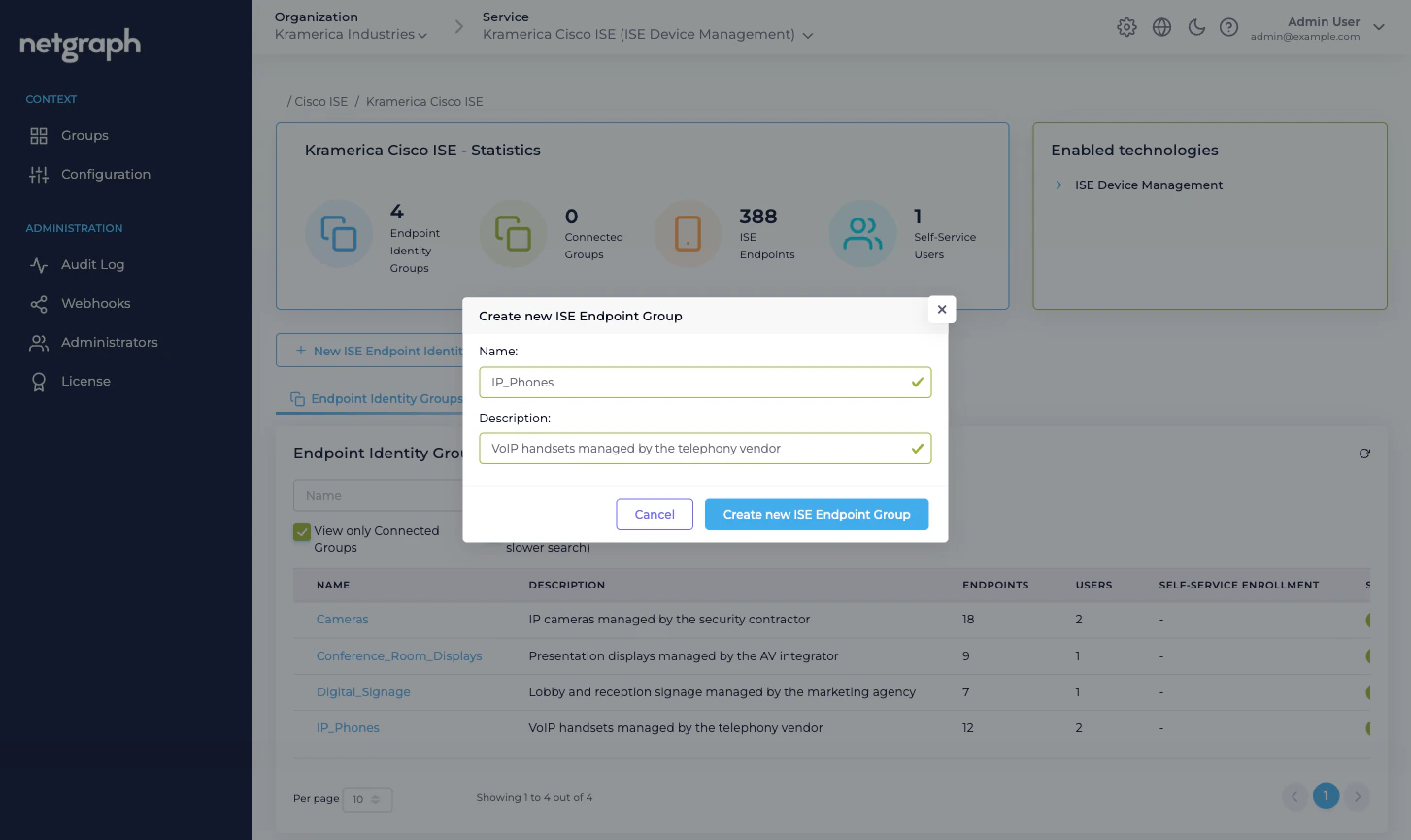
If the group doesn’t yet exist in ISE, create it here and the platform will create it on the ISE side too — in a single step, already connected.Fill in Name and Description
The Name is what Cisco ISE stores; keep it to the
conventions your ISE deployment follows (no spaces, often
underscores). The Description helps you and your
delegated administrators remember what the group is for.
Inside a group
Every connected group’s detail view is the same four-tab shape:| Tab | What it does |
|---|---|
| ISE Endpoints | The endpoints in the group. Search, Add Device, Batch Add Endpoints. |
| Self-Service Users | The delegated administrators on this group, plus the auto-enrollment toggle. |
| Custom Attributes | The group-level values for every Managed Attribute the Context defines. |
| Group Settings | Rename the group on the platform side, and disconnect it from managed administration. |
Group Settings — rename and disconnect
The Group Settings tab holds two cards: Group name and Group Management Status.Rename
Change the group’s display name on the platform side. This is only the name you see in the admin and in the Self-Service portal — it doesn’t touch the ISE-side group name. If you rename the group in Cisco ISE’s own admin, rename it here too so the two sides stay aligned.Disconnect
The only destructive action on the Group Settings tab is Disconnect this group. The platform has no “delete the ISE group” button — you cannot remove an Endpoint Identity Group from Cisco ISE through the platform. Disconnect drops managed administration and cleans up everything the platform layered on top of the ISE group:- Every Self-Service User on the group is removed and their invitations revoked.
- Every Managed Attribute value set at the group level is cleared from the platform.
- The group no longer appears as Connected in the Groups list, and its detail view becomes read-only.
This action will disconnect the group <name> and all associated self-service users and managed settings will be deleted. However, this will not impact any configurations in ISE, such as endpoint identity groups or devices.You can reconnect the group from the Groups list at any time. Endpoints keep flowing through ISE as usual — policy, VLAN, authentication all stay unchanged. If you genuinely want the group gone from Cisco ISE, delete it in ISE’s own admin (under Administration → Identity Management → Groups → Endpoint Identity Groups).
Related
Endpoint Identity Groups
The managed-reflection concept.
Managing endpoints
Inside a group — CRUD and Change of Authorization.
Managed Attributes
Context-level definition, group-level values.
Managing Self-Service Users
Invite, promote, revoke delegated admins on a group.