

vendor-owner, asset-tag,
maintenance-window, security-group-tag, vlan-id, acl-name.
The platform splits the work in two:
- At the Context level, the Organization admin defines which Endpoint Custom Attributes are allowed to be managed.
- At the group level, the delegated administrator (or the Organization admin) sets a value for each defined attribute. That value is applied to every endpoint in the group.
Prerequisite — the attribute must exist in Cisco ISE first
Every attribute you define at the Context level must already exist as an Endpoint Custom Attribute on your Cisco ISE deployment, under Administration → Identity Management → Endpoint Custom Attributes. If you define an attribute in the platform that doesn’t exist on the ISE side, the Context definition itself succeeds but the values never reach ISE — there’s nowhere for them to land. The Managed Attributes tab carries a note reminding you of this; the fix is to add the attribute on the ISE side first.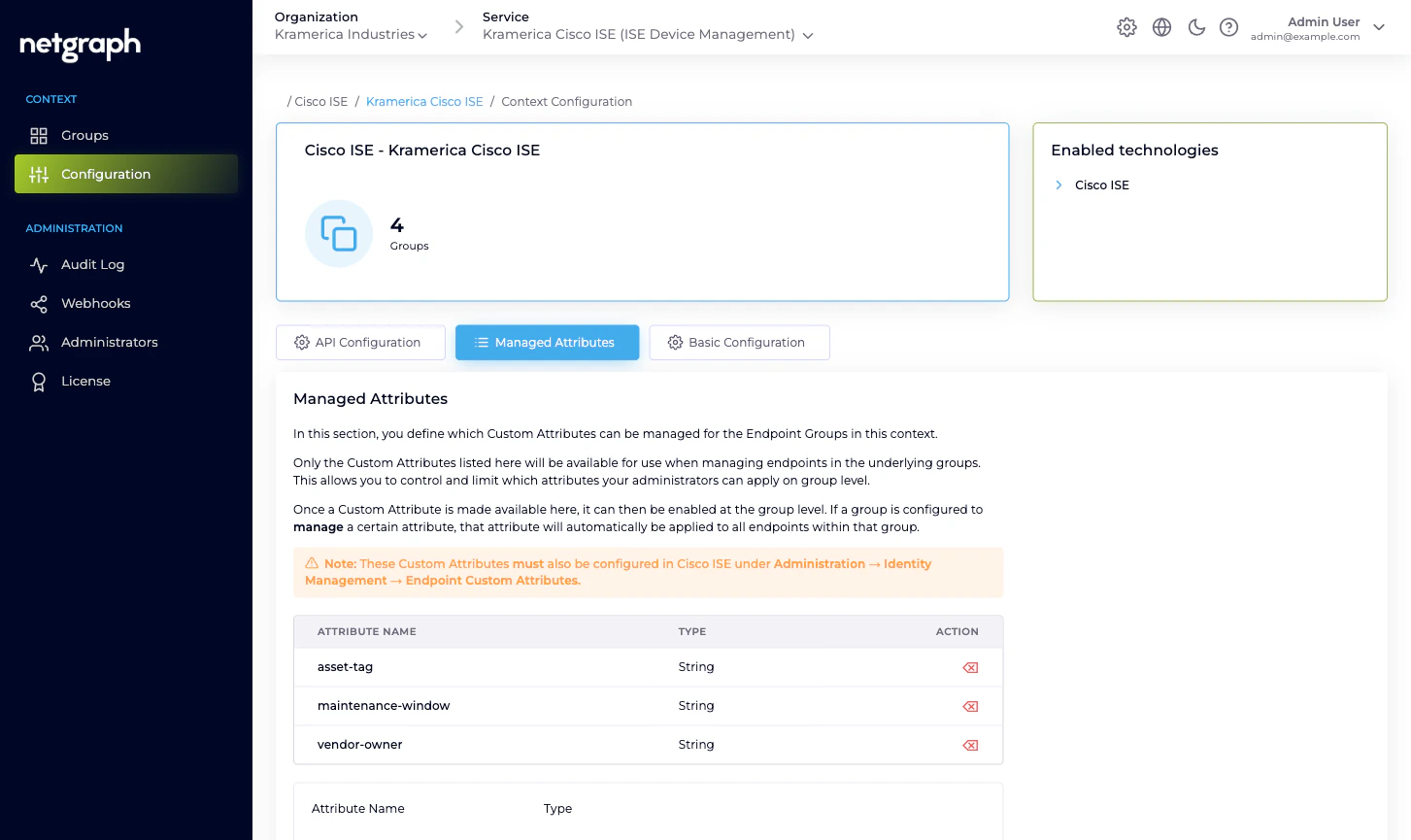
Defining attributes at the Context level
Open the Context’s Configuration → Managed Attributes tab. The panel explains the model and shows a form to add new attributes plus a list of the ones already defined.Enter the Attribute Name
Exactly as it’s spelled on the Cisco ISE side. Case-sensitive.
ISE’s Endpoint Custom Attributes are typically lowercase
with hyphens or underscores; follow the convention your ISE
deployment already uses.
Pick the Type
Must match the type defined in ISE. Options:
- String — any text value.
- Integer — whole number.
- Boolean —
true/false. - Float — decimal number.
- Long — big whole number.
- IP Address — IPv4 or IPv6.
- Date — ISO 8601 date.
Setting values at the group level
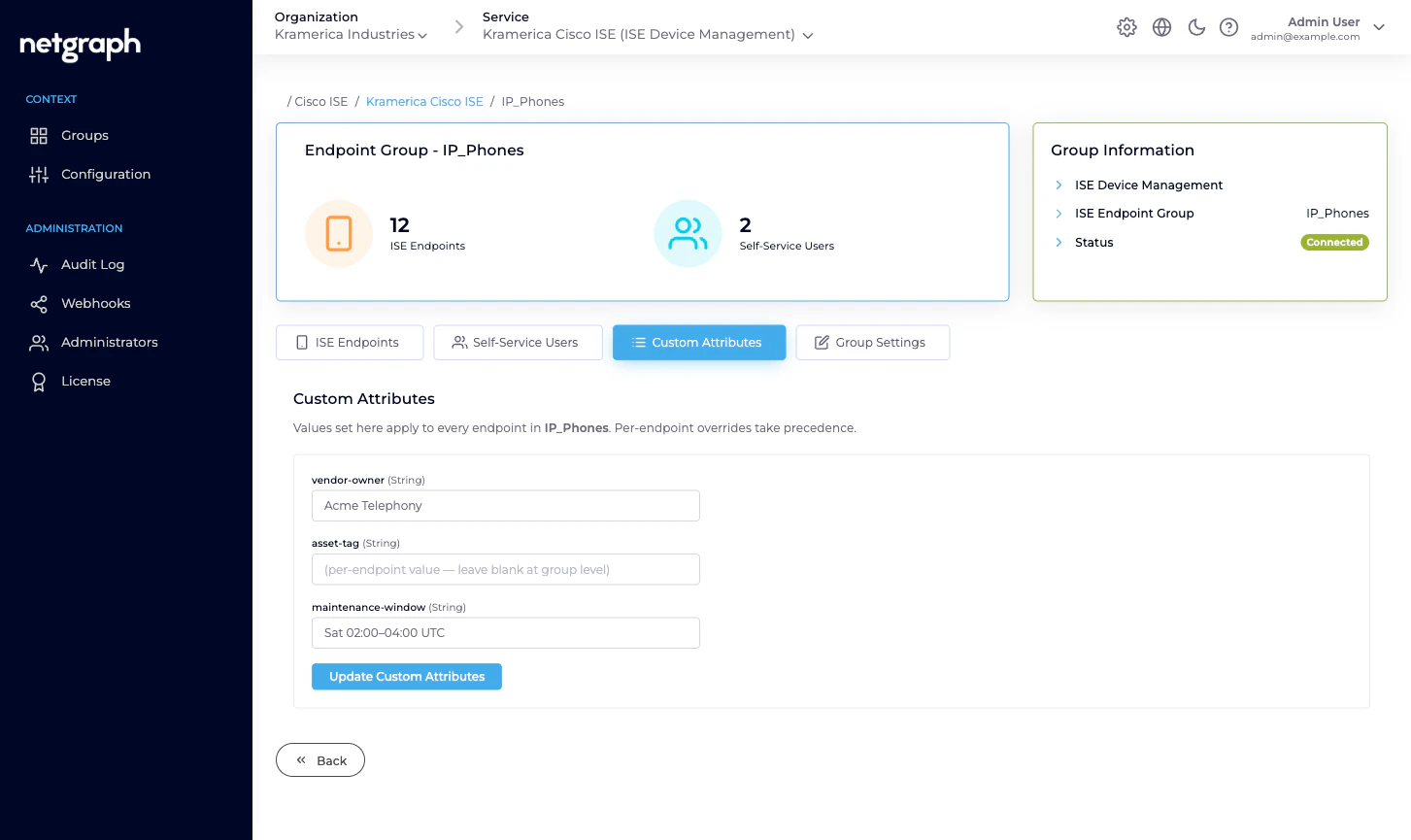
Open a managed group and switch to the Custom Attributes tab. You’ll see every Context-level Managed Attribute as a separate field, with the group’s current value.- String / IP Address / Date render as text inputs.
- Integer / Float / Long render as number inputs.
- Boolean renders as a toggle.
Example: per-group vendor ownership
Context-level definition:| Attribute Name | Type |
|---|---|
vendor-owner | String |
asset-tag | String |
maintenance-window | String |
IP_Phones:
| Attribute Name | Value |
|---|---|
vendor-owner | Acme Telephony |
asset-tag | (per-endpoint, not set at group level) |
maintenance-window | Sat 02:00–04:00 UTC |
IP_Phones carries vendor-owner = Acme Telephony and maintenance-window = Sat 02:00–04:00 UTC
on the ISE side, available for your ISE authorization policy,
reports, or SIEM pipelines. Asset tags are set per-endpoint
because every endpoint’s asset tag differs.
Group-level vs per-endpoint values
Two places set attribute values:- Group-level (the Custom Attributes tab). Applies to every endpoint in the group. Good for values that are uniform across a group — vendor ownership, maintenance window, policy tag.
- Per-endpoint (the endpoint’s Edit dialog, or any of the Managed Attribute fields in the endpoint detail). Applies to that one endpoint only. Overrides the group-level value when both are set.
Synchronisation to Cisco ISE
Attribute changes propagate to Cisco ISE automatically:- Adding or changing a group-level value updates every endpoint in the group.
- Adding or changing a per-endpoint value updates that one endpoint.
- Adding an endpoint to a group picks up the current group-level values.
- Moving an endpoint between groups replaces the source group’s values with the destination group’s.
CoA after an attribute change? If your authorization policy
consumes the attribute and an endpoint is currently online, you
may want to issue a Change of Authorization
so Cisco ISE re-evaluates the policy with the new values.
Otherwise the new values only take effect on the endpoint’s
next authentication.
Common attribute shapes
Examples of how deployments use Managed Attributes:| Attribute | Type | Purpose |
|---|---|---|
vendor-owner | String | Name of the vendor managing the fleet; read by reports and SIEM. |
asset-tag | String | Company asset tag; pushed from inventory systems. |
maintenance-window | String | When it’s OK to reboot or re-configure. |
security-group-tag | String | SGT name ISE applies; drives microsegmentation. |
vlan-id | Integer | VLAN assignment for MAB authorisation. |
acl-name | String | Cisco-managed ACL to apply. |
warranty-expires | Date | Used by asset-lifecycle reports. |
Related
Endpoint Identity Groups
Where group-level values are set.
Managing endpoints
Per-endpoint overrides in the Edit dialog.
Change of Authorization
Force a re-evaluation after an attribute change.
Cisco ISE connection
Which APIs must be enabled for attributes to flow.