

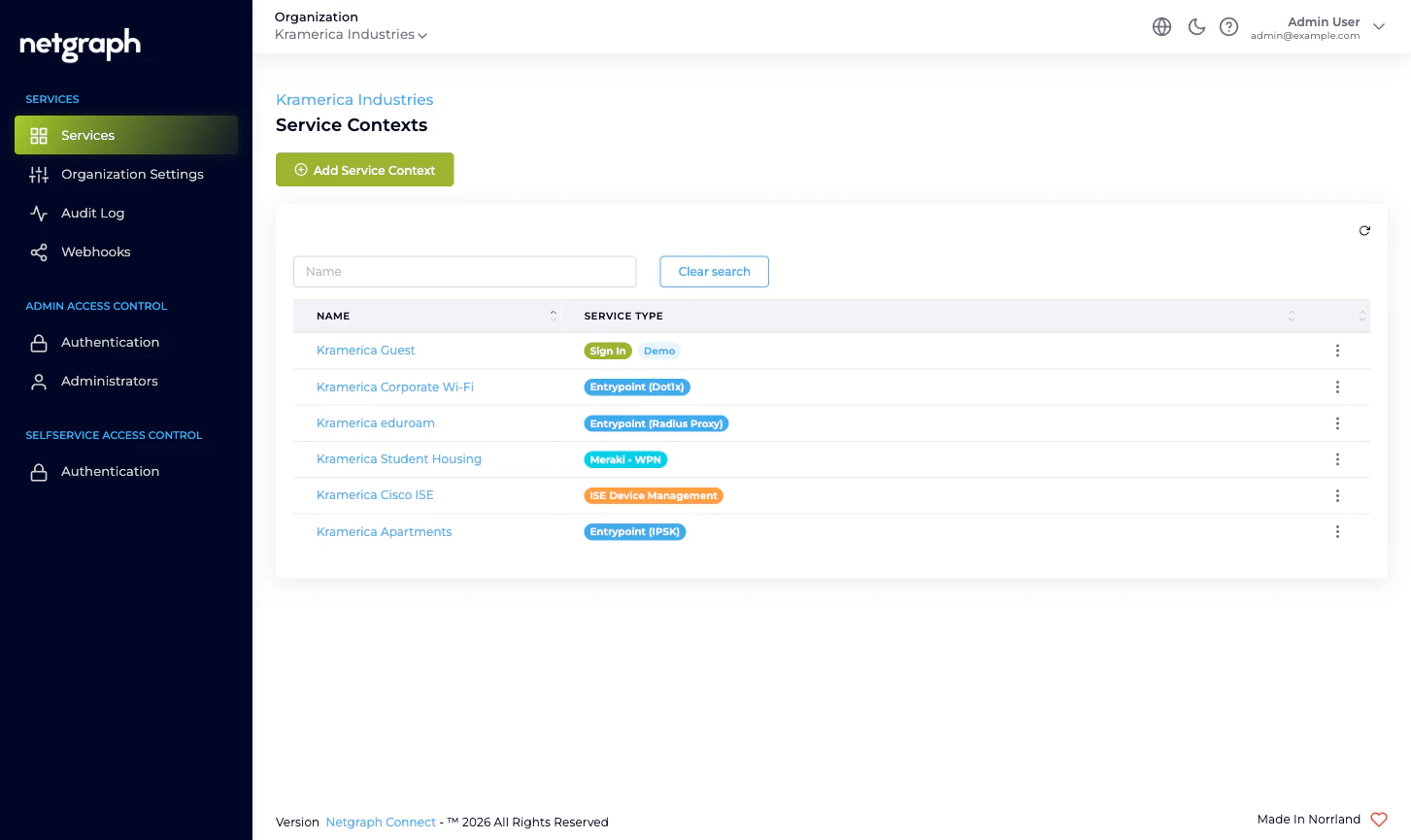
What lives at the Organization scope
Six Organization-level surfaces, all reachable from the left navigation:- Services — the inventory of every Service Context in the Organization. Add new Contexts here; click into existing ones to open their own admin.
- Organization Settings — name, slugs, Active Languages, Admin Dashboard Access whitelist, Mandatory MFA, Self-Service Portal token lifetime.
- Audit Log — the read-only Change log of every administrative action across the Organization, with property- level diffs.
- Webhooks — push every Organization-configuration change to a downstream system as it happens.
- Admin Access Control — Authentication for the Admin Portal (Form Login + optional SAML 2.0) and the Administrators table.
- Selfservice Access Control — Authentication for the Self-Service Portal (Email Magic Link + optional SAML 2.0).
Who operates the Organization
- Organization administrators sign in to the Admin Portal to configure the Organization and the Service Contexts inside it. They hold one or more of three Organization-scope roles — Organization Owner, Organization Context Manager, Organization Member — that decide what they can change. See Administrator roles.
- Self-Service Users are end users (residents managing a Wireless Personal Network, conference hosts, ISE-group delegated administrators) who sign in to the Self-Service Portal for one specific resource inside one specific Service Context. They are managed inside each Service Context, never at the Organization scope.
What the Organization is not
A few mental-model checkpoints:- Not a Service. An Organization doesn’t authenticate users, carry RADIUS sessions, or hand out PSKs. Each Service Context inside the Organization does that work for its own scope.
- Not the unit of branding. Each Service Context configures its own branding, languages, and Sites. The Organization-level Active Languages list controls which languages an admin can pick; it doesn’t push branding into existing Contexts.
- Not a permission ceiling for end users. Self-Service Users in a Sign-In Context don’t inherit anything from the Organization. Their effective permissions come from the Sign-In Context’s own Access Policies.
- Not a place where Service Contexts share state. Two Sign-In Contexts side by side run independently. Adding a Sign-In Module in one doesn’t add it in the other.
What’s new since the previous version of this section
The Organization section has been rewritten to match the rest of the platform docs in depth and structure. Notable changes for returning readers:- The previous “Audit” page implied a CSV-export affordance — there isn’t one. The current docs describe what’s actually available and point at Webhooks for live streaming.
- Federation has been split into the two pages it actually is: Admin Portal authentication and Self-Service Portal authentication. Each is its own SAML SP endpoint with its own configuration.
- The Organization-scope webhook story is honest about the single available event at this scope; per-Service streams are documented inside each Service.
Where to go next
Organization quickstart
Day-one path through the new Organization, end to end.
Organization and Services
The two-layer model — what’s Organization-scope vs Context-scope.
Admin Portal vs Self-Service Portal
Two sign-in surfaces, two SAML configurations, two audiences.
Administrator roles
Owner, Context Manager, Member — and how to combine them.
Organization Settings
Name, slugs, languages, MFA, Admin Dashboard Access.
Admin Portal authentication
Form Login plus optional SAML 2.0 with Default Role Mapping.
Self-Service Portal authentication
Email Magic Link plus optional SAML 2.0 for end users.
Managing Administrators
Invite, edit, resend, remove — and the SAML auto-provisioning path.
Managing Service Contexts
Add a new Context, open an existing one, retire a Context.
Audit Log
Every administrative change in one filterable table.
Webhooks
Stream Organization-configuration changes to your downstream systems.
Organization diagnostics
Common Organization-scope problems and how to work them out.