

What you can subscribe to at this scope
At the Organization scope, the only event a webhook can subscribe to is:| Event ID | Triggered by |
|---|---|
organization.configuration.audit | Any change to Organization-scope configuration — Organization Settings, Admin Portal Authentication, Self-Service Portal Authentication, Administrators, Custom SAML Role Mappings, Service Context lifecycle, and webhook configurations themselves. |
Sign In webhooks
Sessions, captive-portal events, Sign-In configuration audits.
EntryPoint webhooks
EntryPoint configuration audits.
EasyPSK webhooks
Meraki Wireless Personal Network configuration audits.
Endpoint Manager webhooks
Cisco ISE Device Management configuration audits.
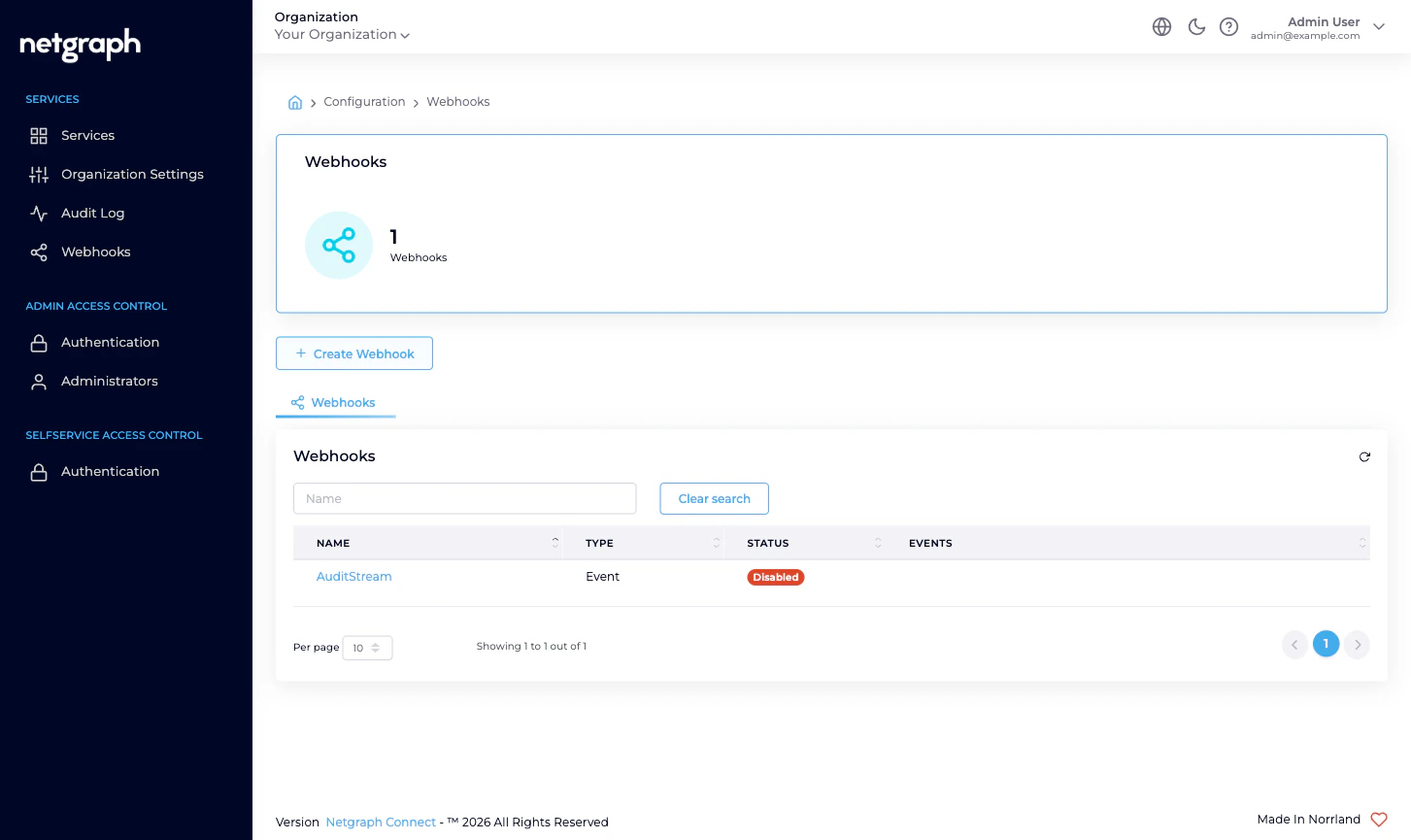
The Webhooks list
The list page shows every Organization-scope webhook in your Organization with the following columns:| Column | What it means |
|---|---|
| Name | The display name you gave the webhook. Click to open its detail. |
| Type | Event (each change delivered immediately) or Batch (changes accumulated and delivered in groups). |
| Status | Enabled (green pill) or Disabled (red pill). |
| Events | Pills showing each event ID the webhook subscribes to. At Organization scope, this is always organization.configuration.audit. |
Creating a webhook
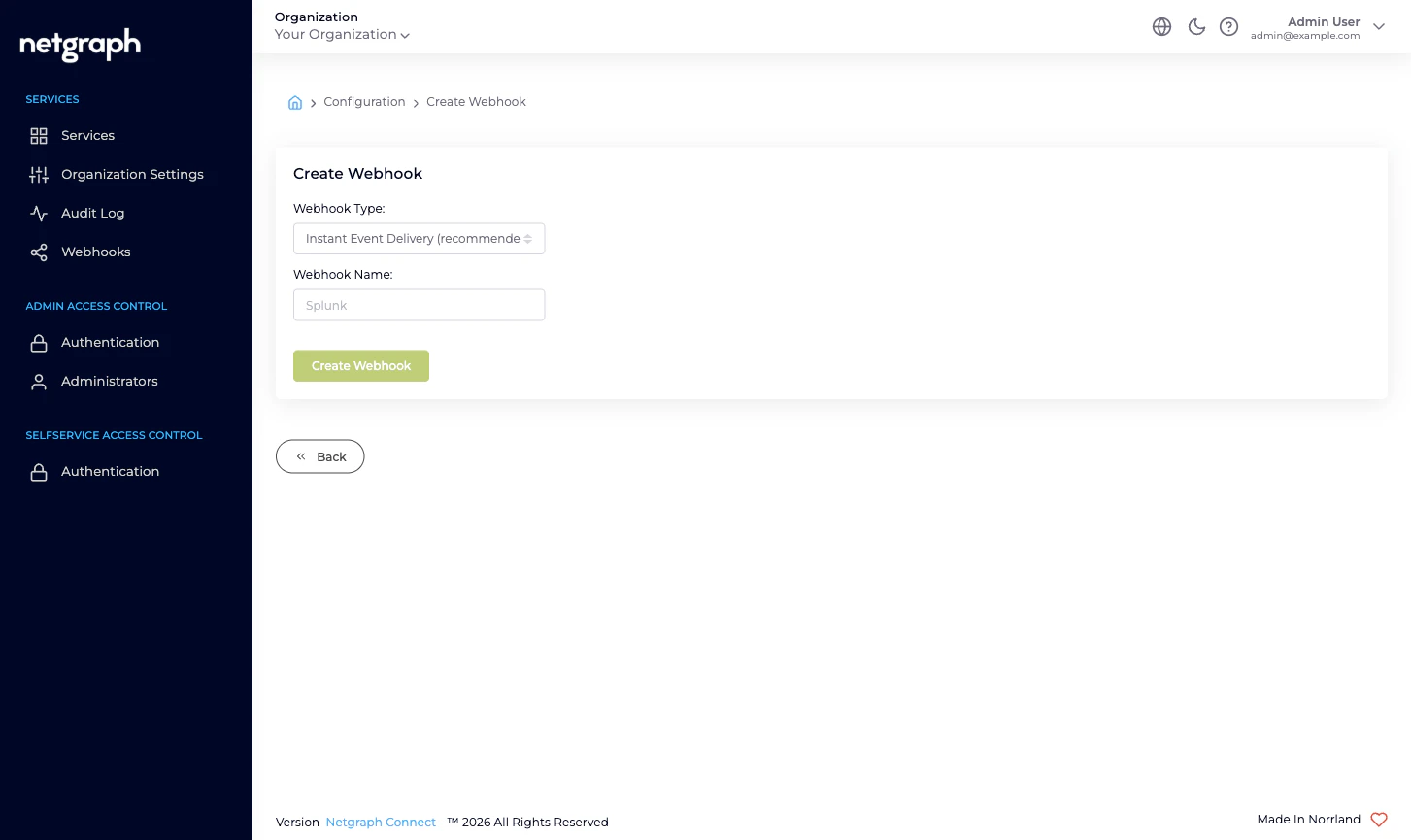
Click Create Webhook. The form has two fields:- Webhook Type: dropdown with two options — Instant Event Delivery (recommended) and Batch Delivery.
- Webhook Name: alphanumeric, 3–125 characters. The name is for your own bookkeeping; it appears in the list and in audit rows whenever the configuration changes.
Event vs Batch — when to pick which
Instant Event Delivery sends one HTTP POST per change as soon as it happens. The right choice when:- The downstream consumer expects each event individually (a SIEM, a workflow engine, a chat-channel notifier).
- You want to react to changes in near-real-time.
- The volume of Organization-configuration changes is naturally modest (a few per hour at most for most teams).
- The downstream consumer would prefer fewer larger requests (a long-term archive, a daily change report, a low-budget endpoint).
- You’re streaming a high-volume Service-level event (sessions on Sign In, for example) and want network efficiency.
Webhook configuration
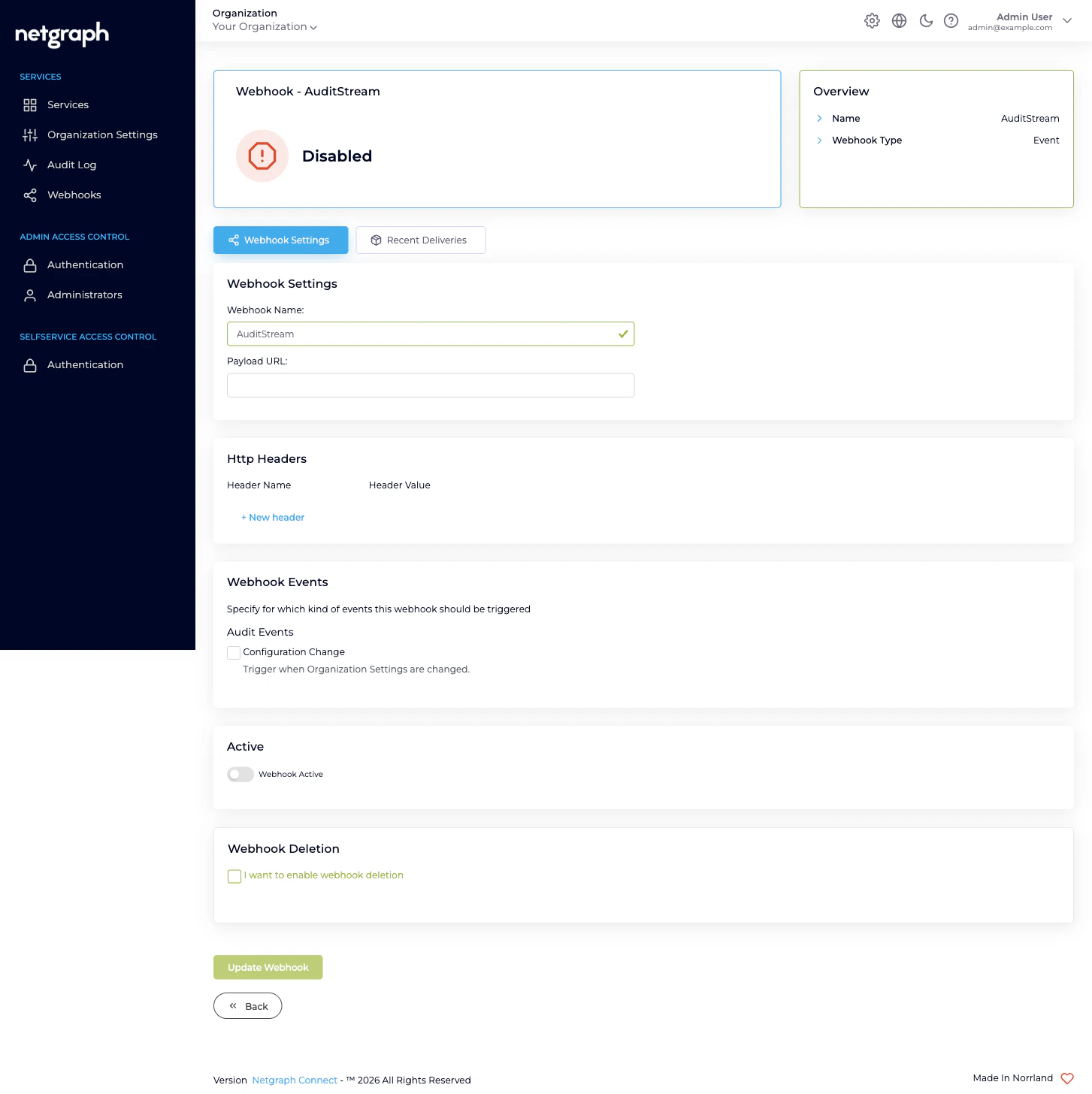
The detail page is laid out as five cards. Edit, save, then enable.Webhook Settings
- Webhook Name — same alphanumeric 3–125-character constraint as creation.
- Payload URL — the HTTPS endpoint the platform POSTs to. 7–500 characters. Must be reachable from the public internet.
Batch Limits (Batch type only)
- Batch Size Limit — flush early when this many events have accumulated. 2–20000.
- Batch Intervall (in minutes) — flush after this many minutes even if the size limit hasn’t been hit. 1–86400 (the default is 20).
Headers
Add custom HTTP headers to every outgoing POST. The right place to plumb authentication for your downstream endpoint — a bearer token, a shared secret your endpoint validates, a tenant identifier. The platform does not sign payloads itself; if your endpoint needs to verify the request came from the platform, encode that as a header the endpoint can validate.Webhook Events
The single subscribable event at this scope, presented as a checkbox you tick:- Configuration Change (
organization.configuration.audit) — Trigger when Organization Settings are changed. (Despite the label this covers the full set of Organization-scope configuration changes listed earlier.)
Active
A toggle. The webhook is created disabled; tick Webhook Active to start delivering events. You can leave the toggle off indefinitely while you finalise the configuration.Inspecting deliveries
Open a webhook’s detail and switch to the Recent Deliveries tab to see what the platform actually sent and what your endpoint returned. Each row is one delivery (one HTTP POST attempt or a sequence of attempts). For Batch-type webhooks, the Pending Events tab shows what’s queued but not yet flushed. Click a delivery row to see:- The full Payload the platform sent (collapsible JSON block).
- One Delivery Attempt card per attempt, with Request and
Response sub-tabs:
- Request — the headers the platform sent (your custom Headers plus the platform’s standard ones).
- Response — the HTTP status code your endpoint returned, the response headers, and the response body (truncated for very large responses).
- A
Completed in X seconds.footer per attempt.
Retry behaviour
If the first attempt doesn’t return a successful (2xx) response, the platform retries with an increasing delay between attempts. After several attempts the delivery is marked Failed and the platform stops retrying that specific delivery; subsequent events are still attempted on their own retry budget. There is no manual “retry now” button — failed deliveries stay visible in Recent Deliveries for inspection but cannot be re-sent. If your endpoint is fixed and you want to backfill missed events, replay them from the Audit Log or from your own change-source-of-truth instead. Successful deliveries are marked Completed.Delivery history retention
Recent Deliveries keeps each delivery for 3 days after the last attempt and then ages it out. The webhook configuration itself is preserved indefinitely; only the per-delivery history is on a TTL. If you want a longer-lived record of every delivery, log them on your endpoint side — the platform does not store deliveries beyond the 3-day window.What’s audited about webhooks themselves
Every webhook lifecycle event — create, edit, enable, disable, delete — emits anorganization.configuration.audit event of its
own. This means: a webhook can deliver an audit row about its
own configuration change (and about changes to other webhooks
in the same Organization). When debugging a webhook, expect to
see the configuration changes you make appear in the live stream
moments later.
Where to go next
Audit Log
The permanent record. Webhooks are the live counterpart.
Organization Settings
Every save here triggers a webhook delivery.
Managing Administrators
Administrator invites, role changes, and removals all flow through this stream.
Organization diagnostics
“My webhook isn’t delivering” — and other webhook issues.