

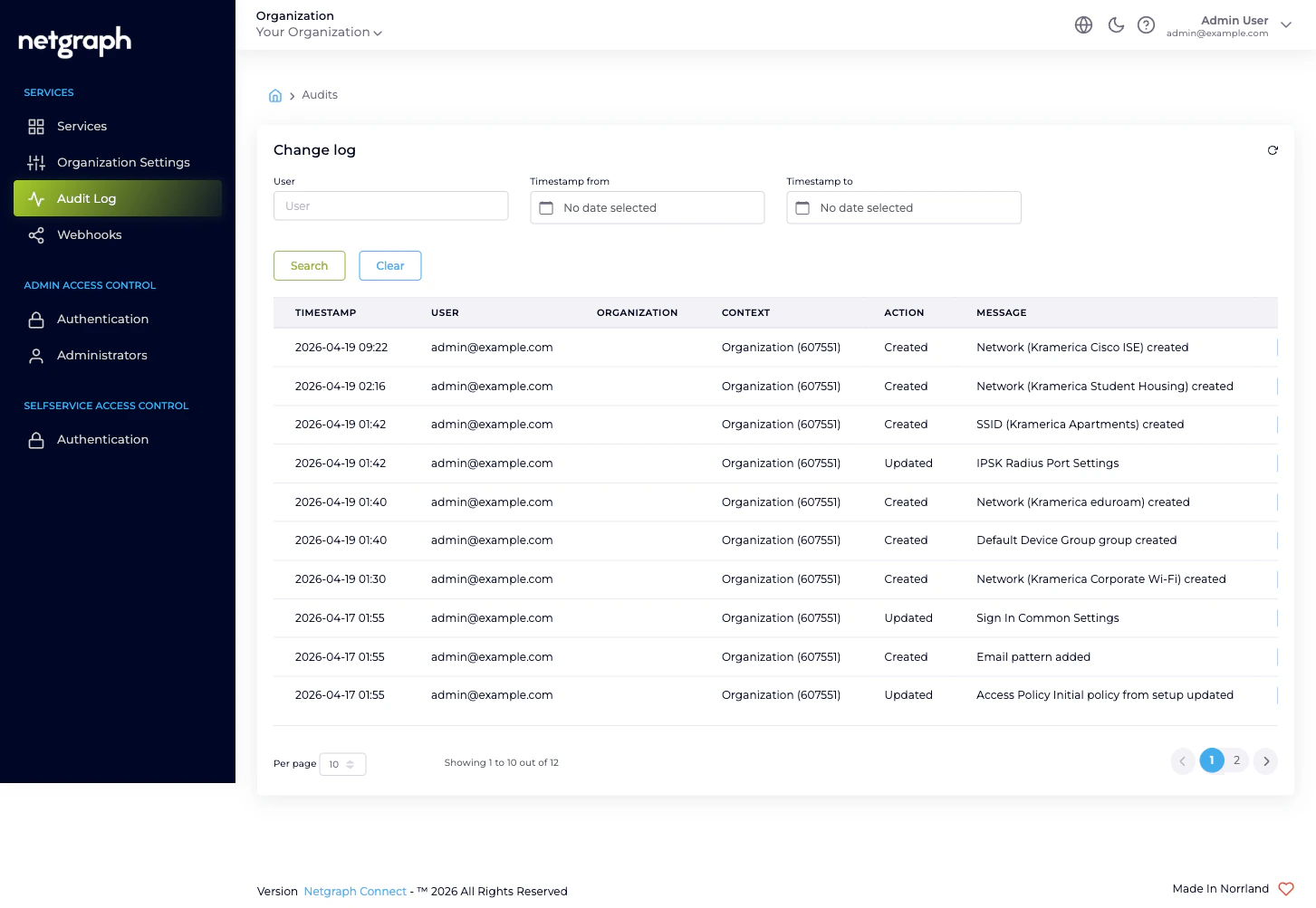
Filtering
Three filters at the top of the page, each empty by default:- User — text match on username (the admin’s email). Partial matches are supported; type a few characters and click Search.
- Timestamp from — date picker. Returns only rows at or after the date.
- Timestamp to — date picker. Returns only rows at or before the date.
What each column tells you
| Column | What it means |
|---|---|
| Timestamp | When the action happened, displayed in your Organization’s timezone. |
| User | The username (email) of the administrator who took the action. system for actions the platform itself performed (e.g. cascade cleanups). |
| Organization | The Organization the change belongs to, with the Organization ID in parentheses. |
| Context | The Service Context the change belongs to, when the change is Context-scope. Empty when the change is Organization-scope. |
| Action | One of Created, Added, Viewed, Updated, Deleted, Removed — the verb the platform applies to the change. |
| Message | A short human-readable summary, typically including the resource type and the resource name. |
| Details | A toggle that expands the row to reveal the property-level diff. |
Drilling into a row
Click Show Details on any row to expand it. The expansion is a Property / Old Value / New Value table — every property the action touched, with the value before and after.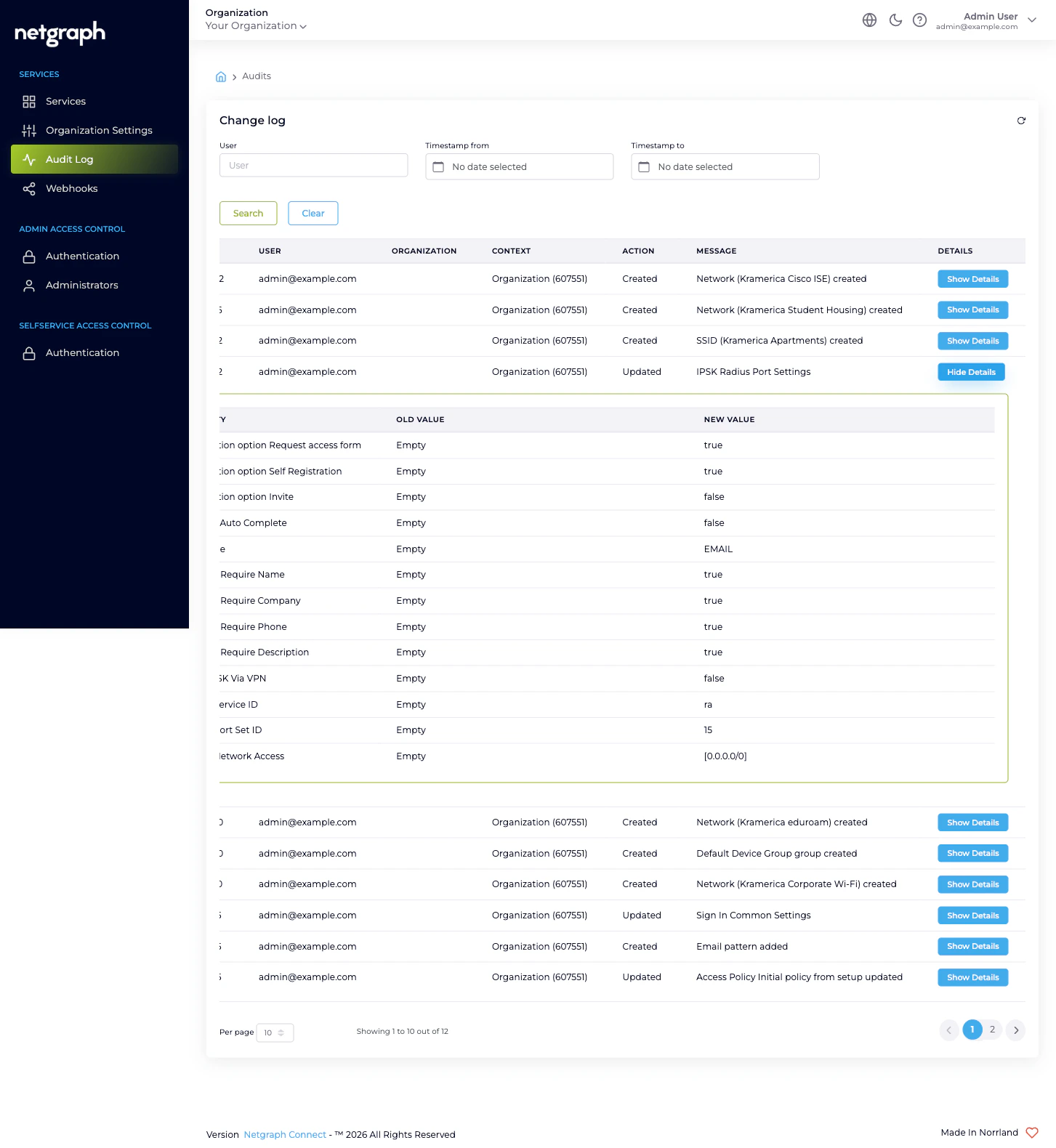
- Empty values display as the literal text
Empty. So an initial creation typically shows every property going fromEmptyto its first value. - Secret-marked properties (passwords, certificates, tokens,
API keys, RADIUS shared secrets) display as
hidden value *for both Old Value and New Value. The platform never stores or reveals the secret in the audit log; the row records that the property was changed, not what to.
What changes are captured
Every saved change to an audit-tracked property emits a row. That includes, but is not limited to:- Organization Settings — name and website, Language Settings, Organization Slugs, Admin Dashboard Access entries, Mandatory Email MFA, Self-Service Portal Settings.
- Administrators — invitation, role change, removal, resend-invitation.
- Authentication configurations — Admin Portal SAML, Self- Service Portal SAML, Custom SAML Role Mappings.
- Webhook configurations — create, edit, enable, disable, delete.
- Service Context lifecycle — Context created, Context renamed, Context removed.
- Inside each Service Context — every Sign-In Module, every EntryPoint Group, every Wireless Personal Network, every managed Endpoint Identity Group, every Access Policy. Those rows have a non-empty Context column.
What the Audit Log is not
- Not exportable as CSV. There is no download or export affordance on this page. To stream the audit feed continuously to a SIEM or archive system, configure a webhook at the Organization scope. That delivers each Organization-configuration change as it happens.
- Not a session log. End-user sessions on Sign-In, RADIUS authentications on EntryPoint, DHCP exchanges, and similar operational events are not audit events — they are session-tier data captured separately by each Service.
- Not a security incident log. The Audit Log records what administrators changed, not what end users tried to do. For authentication events on the Admin Portal itself (sign-in attempts, MFA prompts, SAML callbacks), use the relevant Service Context’s own diagnostics.
Retention
Audit rows are retained for the lifetime of the scope they belong to. Rows scoped to the Organization remain as long as the Organization exists; rows scoped to a Service Context are removed when that Context is removed. Removing the Organization itself cascades through every Context’s audit rows. There is no separate retention policy or trim schedule. The Audit Log grows monotonically with administrative activity until a scope is deleted.Where to go next
Webhooks
Stream Organization-configuration changes to a downstream system as they happen.
Organization Settings
Every change here ends up in the Audit Log.
Managing Administrators
Invitations, role changes, and removals all emit audit rows.
Organization diagnostics
“I can’t find the change I just made” — and other Audit Log issues.