

The three Organization-scope roles
| Role | Best for | What it grants |
|---|---|---|
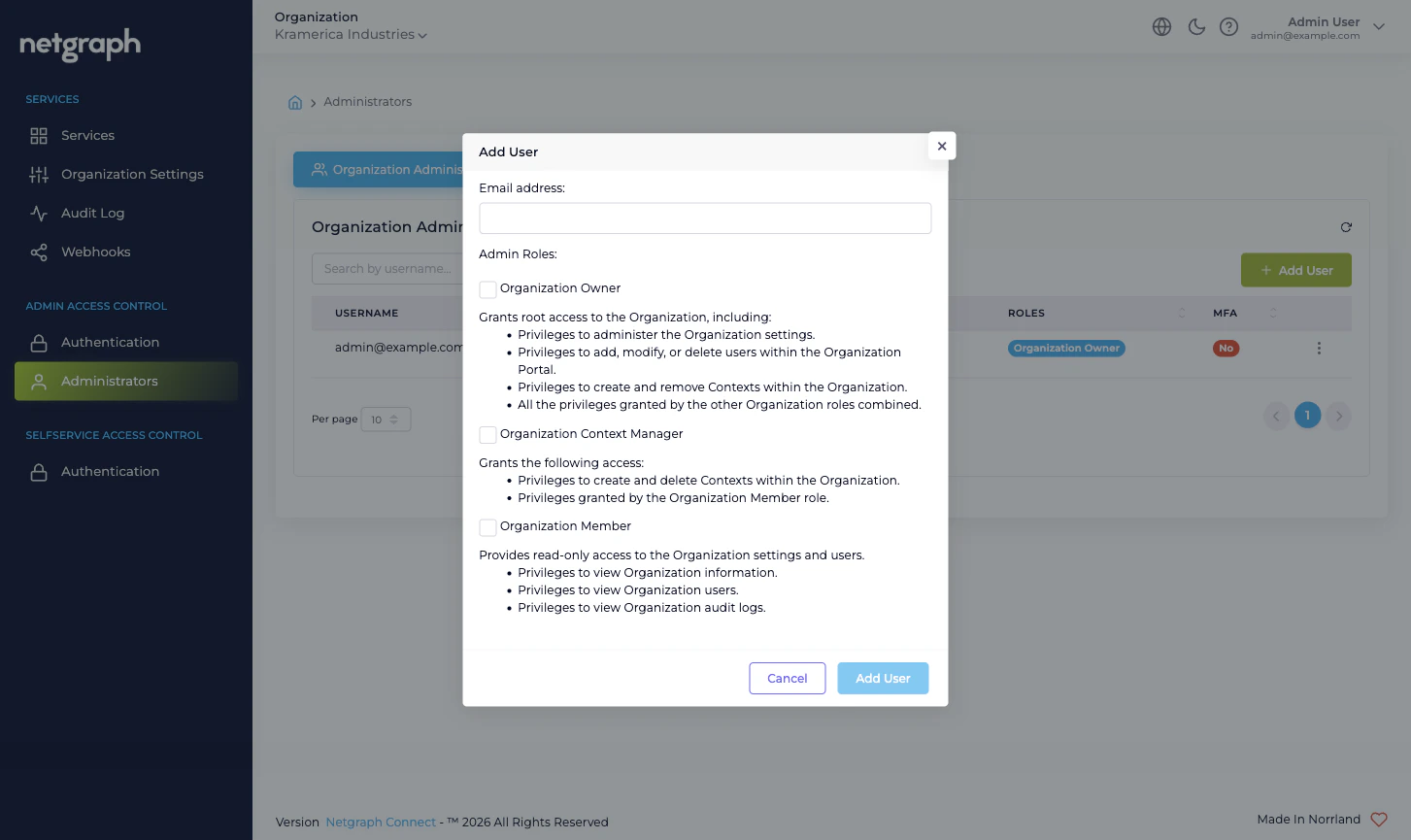
| Organization Owner | The team running the Organization end to end | Full administrative access. Can change Organization Settings, manage administrators (including other Owners), configure both Admin Portal and Self-Service Portal authentication, add or remove Service Contexts, and manage every Service Context. |
| Organization Context Manager | A delegated platform-side admin who runs Service Contexts but doesn’t own the Organization itself | Can add, configure, and remove Service Contexts; can act as administrator inside every Context. Cannot change Organization Settings, cannot manage other administrators, cannot change federation. |
| Organization Member | A read-only or limited-scope administrator | Can sign in to the Admin Portal and view the Organization’s structure. Operationally, this is the role to combine with Self-Service Permissions inside specific Service Contexts when an administrator should only be able to do things you’ve explicitly delegated them inside Contexts. |
Owner is the only role that can change the lock
A few capabilities are reserved for Organization Owner:- Promoting and demoting other administrators, including granting and revoking Organization Owner.
- Changing Organization Settings — Organization name, slugs, Language Settings, Admin Dashboard Access whitelist, Mandatory Email MFA, Self-Service Portal token lifetime.
- Configuring Admin Portal Authentication — enabling SAML 2.0, changing the Default Role Mapping, rotating IdP certificates.
- Configuring Self-Service Portal Authentication — enabling SAML 2.0 for the Self-Service Portal.
Context-scope roles vs Organization-scope roles
The Admin Portal also surfaces Context-scope roles when you open a Service Context’s own administration tab — a Sign-In Context exposes Sign-In administrators, an EntryPoint Context exposes EntryPoint administrators, and so on. These are managed inside each Service Context and only ever apply to that Context. The boundary is:- Organization-scope roles (Owner / Context Manager / Member) are managed at Organization → Administrators. They decide who can sign in to the Admin Portal at all and what cross-Context capabilities they have.
- Context-scope administrative roles are managed inside each Service Context. They decide who can do what within that particular Sign-In, EntryPoint, EasyPSK, or Endpoint Manager Context.
- Self-Service Permissions are a third, separate axis. They decide what a delegated end user (a Self-Service User) can do through the Self-Service Portal — managing a conference, hosting a Wireless Personal Network for one apartment, administering one Endpoint Identity Group. They are configured inside each Service Context, on the relevant resource (Access Policy, Group, Wireless Personal Network), and never granted here.
What’s not available at this scope
The Organization scope deliberately does not provide:- Service accounts or API keys. Every administrative action comes from a real user identity, audited by username. If you need programmatic access to administer a Service Context, federate the Admin Portal with SAML and have the automation IdP issue an assertion for a dedicated machine identity in your IdP. Treat that machine identity like any other administrator: invite it, give it the smallest role that works, audit it.
- SCIM provisioning. Administrators are added through invite or through SAML Just-In-Time provisioning (the first time a user authenticates via SAML, they’re auto-created with the Default Role Mapping). There is no SCIM endpoint to push a user directory into.
- Per-page permissions. The role catalog is intentionally coarse. If your access-control needs are finer than the three Organization-scope roles allow, the right place to express them is at the Self-Service-User layer inside the relevant Service Context, not at the Organization scope.
Where to go next
Managing Administrators
Invite, edit, resend, and remove administrators.
Admin Portal authentication
Form Login and SAML 2.0 with Default Role Mapping.
Admin Portal vs Self-Service Portal
Why the two surfaces have separate authentication.
Organization Settings
Mandatory MFA, Admin Dashboard Access whitelist.