

Prerequisites on Cisco ISE
You need three things on the ISE deployment before you touch the admin dashboard:1. Enable the three API families
Endpoint Manager uses three of Cisco ISE’s API families in parallel:- ERS (External RESTful Services) — for reading and creating Endpoint Identity Groups and listing endpoints in bulk.
- Open API — for per-endpoint CRUD and bulk endpoint upserts (used by both admin-side and Self-Service-side operations).
- Monitoring API (MnT) — for reading live session data and issuing Change of Authorization.
2. Create a dedicated API user
Mint an ISE admin user specifically for Endpoint Manager. The user needs permission to:- Read Endpoint Identity Groups.
- Create Endpoint Identity Groups (only if you’ll create groups from the platform rather than only connecting existing ones).
- Read, create, update and delete endpoints.
- Read endpoint session data from the Monitoring API.
- Issue Change of Authorization requests.
3. Allow the platform’s egress FQDN
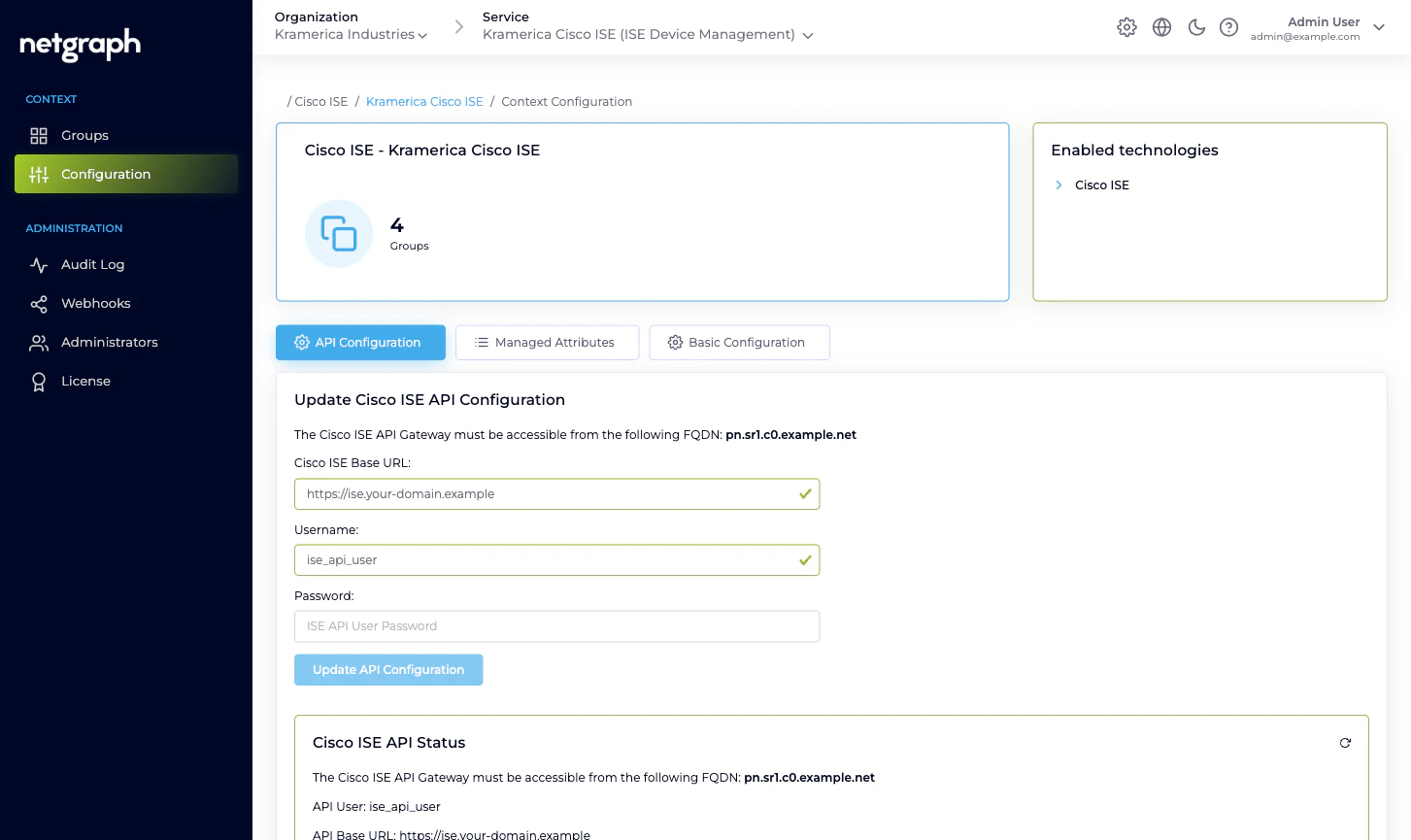
Cisco ISE must accept inbound HTTPS connections from the platform’s egress FQDN. The exact FQDN is shown in the admin’s API Configuration card — it looks likepn.sr1.c0.example.net. Add it to whatever firewall, proxy or
ACL sits in front of the ISE admin node.
ISE can be on-premises or cloud-hosted — Endpoint Manager only
cares that it’s reachable over HTTPS from that FQDN. Deployment
topology makes no difference to the platform.
The API Configuration tab
Open the Context’s Configuration → API Configuration tab.Fields
- Cisco ISE Base URL. The HTTPS URL of your ISE admin node,
for example
https://ise.your-domain.example. The platform talks to the same base URL for all three API families — ERS, Open API and Monitoring paths are all rooted there. - Username. The API user you created above.
- Password. The API user’s password. Stored encrypted, never shown back. The field is blank when you return to the tab even though the saved password is still in use — enter a new password only if you want to rotate it.
Saving
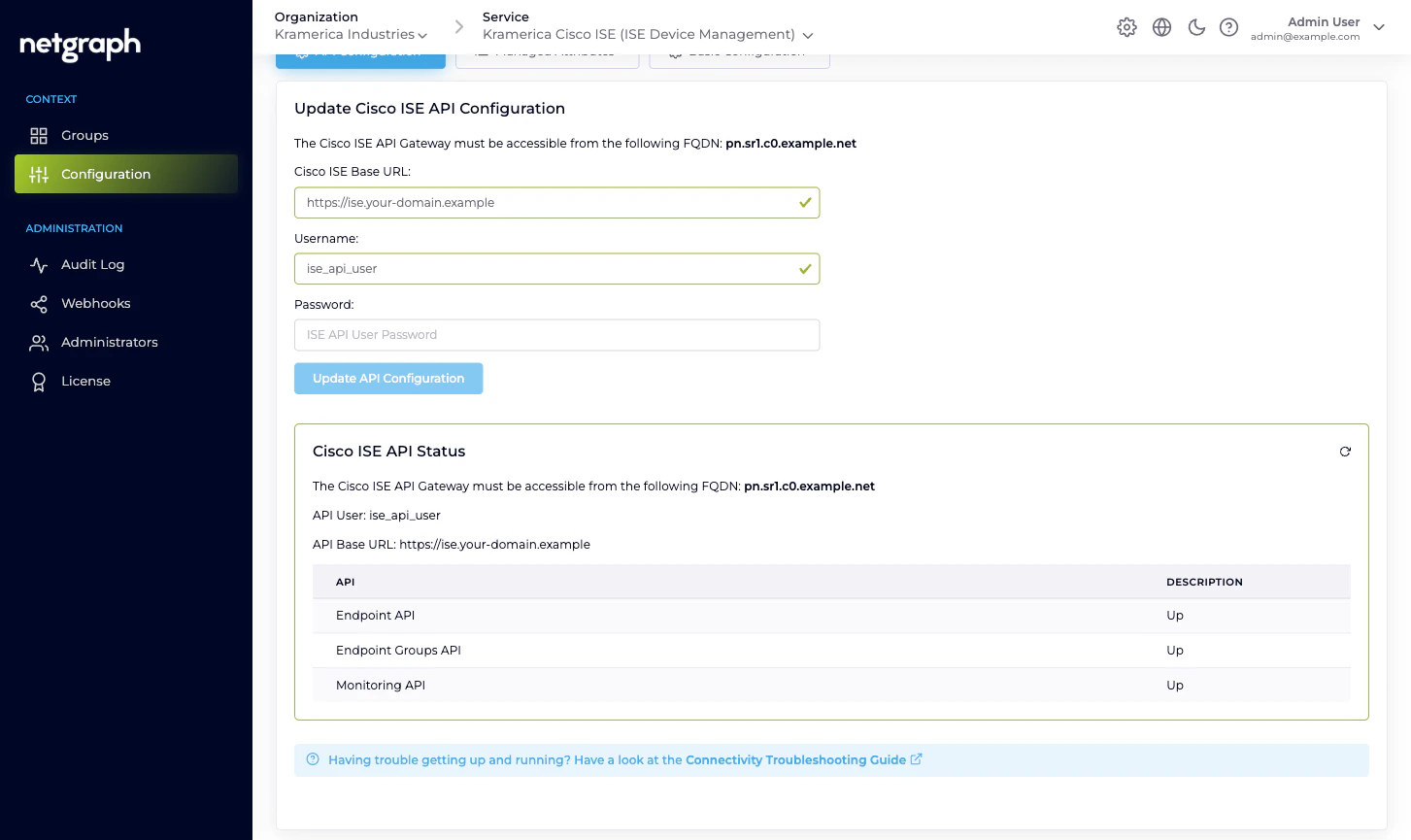
Click Update API Configuration. The platform immediately exercises the credentials against all three API families:- Lists a page of Endpoint Identity Groups via ERS.
- Fetches a page of endpoints via Open API.
- Pings the Monitoring API for a harmless query.
| API | What Up means | What Down usually means |
|---|---|---|
| Endpoint API | Open API is reachable and the user can read endpoints. | Open API isn’t enabled, or the user lacks endpoint permissions. |
| Endpoint Groups API | ERS is reachable and the user can read groups. | ERS isn’t enabled, or the user lacks group permissions. |
| Monitoring API | MnT is reachable and the user can query session data. | MnT isn’t enabled on the deployment or the user isn’t authorised for it. |
Help text
The API Configuration tab carries a Connectivity Troubleshooting Guide link that walks you through the ISE-side enablement step by step if something isn’t working.When to re-verify
Re-open API Configuration and re-save whenever any of these change on your ISE:- The API user’s password.
- The API user’s role / permission set.
- The ISE Base URL (for example, a cert renewal that reissues the admin node under a different hostname, or a migration to a new deployment).
- Enablement of any of the three API families.
Related
Quickstart
Context create → API Configuration → first managed group.
Endpoint Manager Context
What a Context holds and how it talks to ISE.
Managed Attributes
Define Endpoint Custom Attributes once the connection is up.
Troubleshooting
Symptoms and their usual causes.