

Who needs this
- EAP-TLS with Microsoft Entra ID variants require an Entra connection. The certificate-bearer-to-Entra-group-lookup is what ties an EntryPoint Group to its Entra group.
- EAP-PEAP variants optionally use an Entra connection for Entra-backed PEAP Groups — employees authenticate with their Entra credentials rather than a locally-generated Personal PEAP Account. Per-firm contractor Groups usually keep local Personal PEAP Accounts (their people aren’t in your Entra tenant to begin with); Entra-backed Groups are typically employee-facing.
The Identity Store dropdown
On Basic Configuration, the Backend Identity Store dropdown has two options (verbatim):--- No Backend Identity Store ---(default). EntryPoint stores PEAP accounts locally. EAP-TLS Groups are not creatable in this mode through the admin UI’s shipped path.Microsoft Entra ID. Pick this to enable the Entra connection and reveal the configuration fields below.
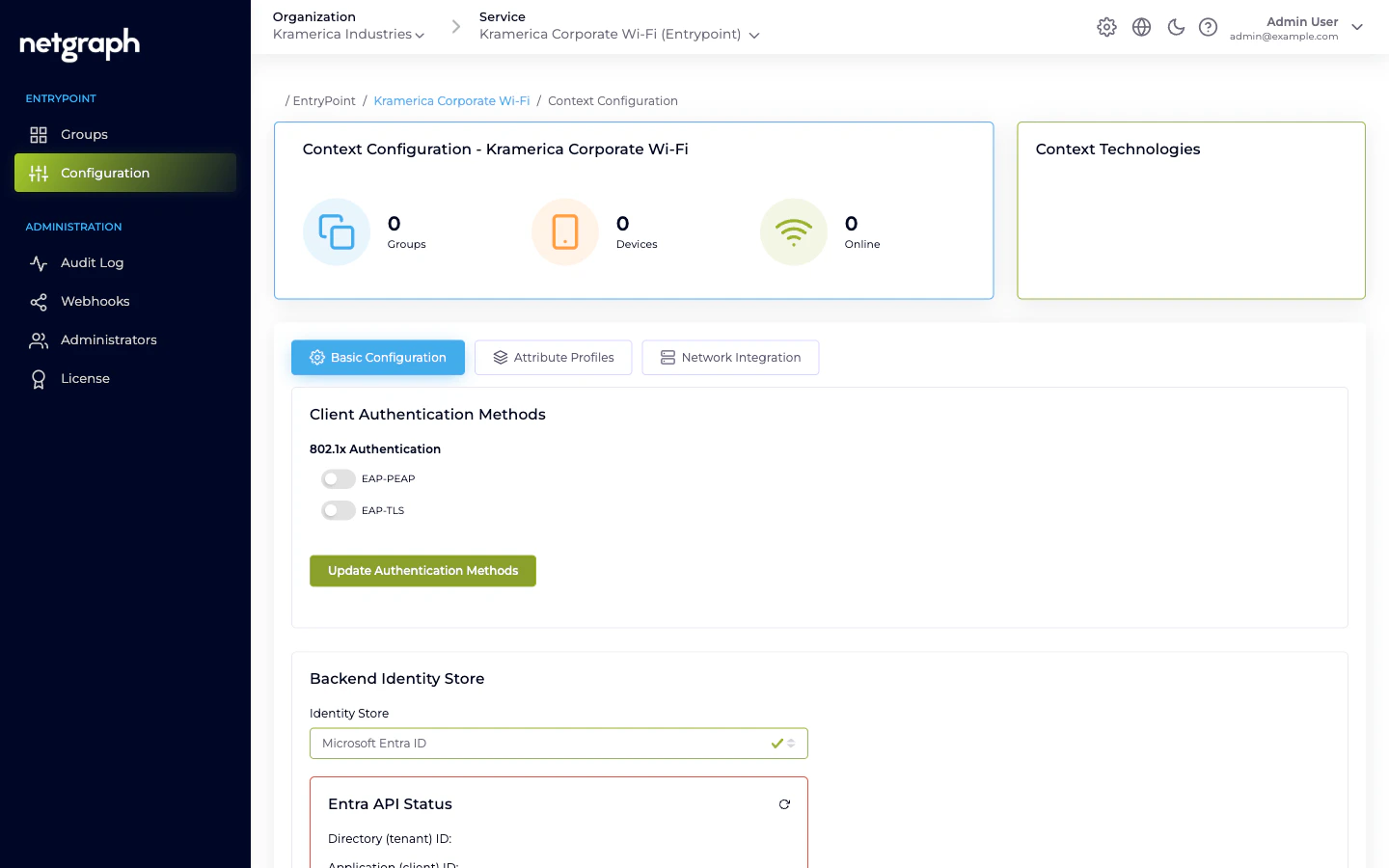
The three Entra values
EntryPoint needs three values that you generate in the Entra admin centre against an App Registration for this EntryPoint deployment:- Directory (tenant) ID — the GUID of your Entra tenant.
- Application (client) ID — the GUID of the App Registration.
- Client Secret — the secret value generated on the App Registration.
- Enable Device Compliance Check — when on, EntryPoint queries Entra at authentication time to verify the device is registered and (if paired with Intune) compliant. Rejects non-compliant devices at the RADIUS layer.
Entra-side setup
Register an application in Entra
In the Entra admin centre, create an App Registration named
something like Netgraph EntryPoint. Note the Directory
(tenant) ID and Application (client) ID.
Grant Microsoft Graph API permissions
The application needs enough permission to read user and device
information, plus group memberships. Your Netgraph contact can
supply the minimum required set; broadly it covers
User.Read.All,
Device.Read.All, GroupMember.Read.All, and (for Device
Compliance Check) the compliance-related permissions. Grant
admin consent for the tenant once the permissions are added.Generate a client secret
On the App Registration’s Certificates & secrets page, create a
new client secret. Copy the value immediately — Entra only
shows it once. Note the expiry date; you’ll need to rotate the
secret before then.
Paste the three values into EntryPoint
In the Context’s Entra configuration, paste the Directory ID,
Application ID, and Client Secret. Save.
Verify the Entra API Status card turns green
The card at the bottom of the Identity Store configuration
exercises the credentials against the Graph API. If it shows an
error, the typical causes are wrong secret (retype carefully),
missing permissions (add on the App Registration and grant
admin consent), or firewall egress issues on EntryPoint’s side.
How Entra is used at authentication time
Per authentication — for both PEAP-Entra and EAP-TLS Groups:- EntryPoint reads the user or device identifier from the request (PEAP username, or certificate bearer for EAP-TLS).
- Calls Microsoft Graph via the Application credentials to resolve the identifier to an Entra user / device record.
- Reads the principal’s group memberships.
- Matches against the EntryPoint Group’s mapped Entra group ID (for EAP-TLS) or the Group’s Entra-group mapping if set (for Entra-backed PEAP).
- (Optional) If Enable Device Compliance Check is on, calls Graph again to check the device’s compliance posture.
- Access-Accept or Access-Reject, with the Group’s Attribute Profile on accepts.
Rotating the Entra client secret
Entra client secrets expire — typically every 12 or 24 months, depending on what your Entra admin picked on creation. Rotate before expiry to avoid an outage.Generate a new secret alongside the old one
On the App Registration in Entra, add a new client secret. Keep
the old one in place for now.
Paste the new secret into EntryPoint
Update the Identity Store configuration on every Context using
this App Registration. Save.
Google identity — not exposed today
The backend has a placeholder for Google Workspace as an identity source, but the admin UI does not currently expose it and no working implementation is shipped. Don’t plan integrations that depend on Google-backed PEAP; check in with your Netgraph contact if you have a specific need.When to pick No Backend Identity Store
- Small or isolated deployments where no central IdP is in scope (a single venue, a test environment, a contractor-only deployment).
- Contractor-only Contexts. If the whole Context’s audience is external consultants, local Personal PEAP Accounts are simpler — EntryPoint is the only system in the loop.
- Cost-sensitive setups where adding identities to your Entra tenant isn’t practical.
Related
EAP-TLS with Entra
The variant that requires this connection.
EAP-PEAP overview
Local PEAP by default; Entra-backed option for employees.
Device certificates & Intune
Device Compliance Check in detail.
Trusted certificates
The other half of EAP-TLS configuration — CA uploads.