

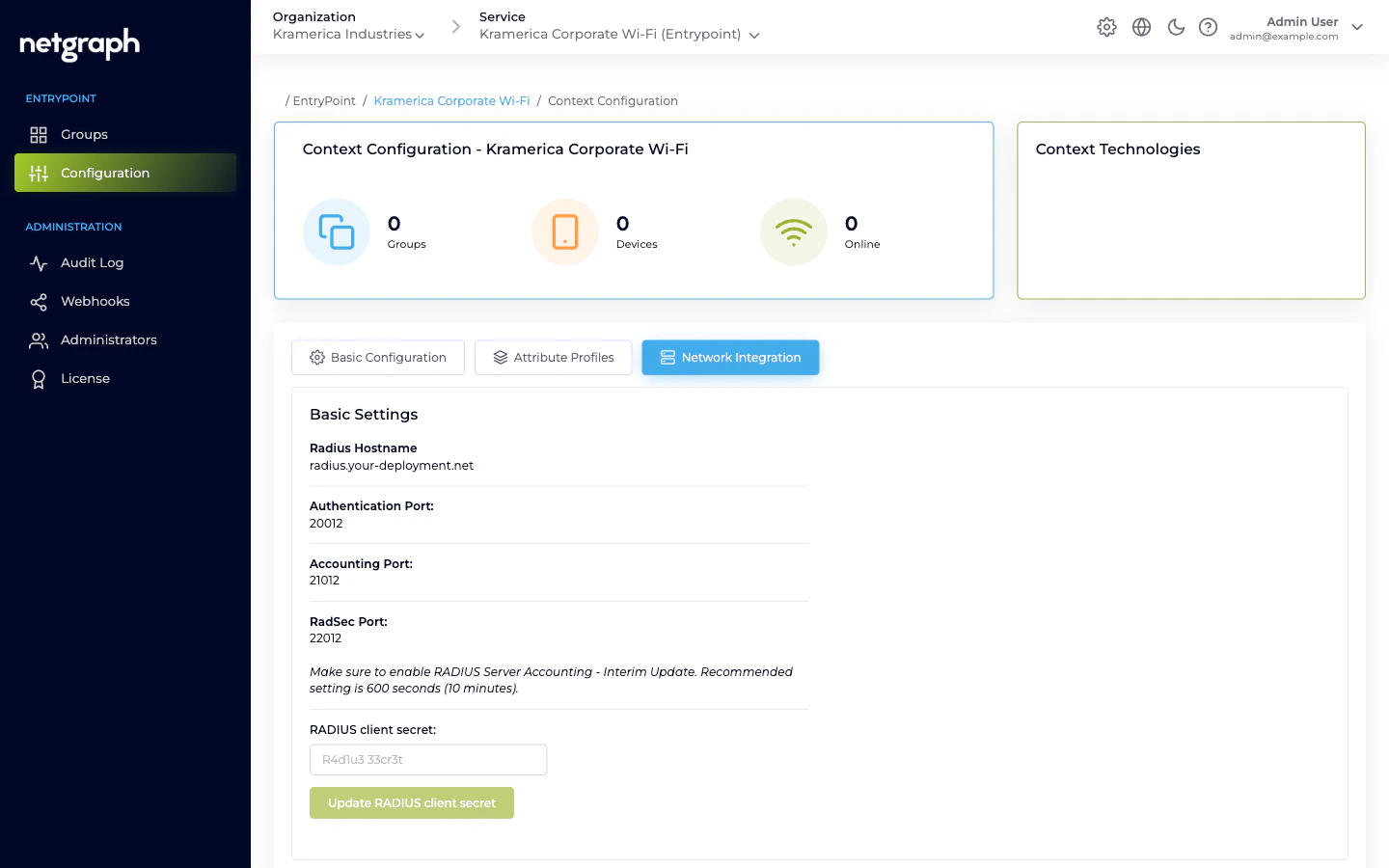
What the Basic Settings card shows
- Radius Hostname — the hostname your equipment points at. Read-only; generated per Context.
- Authentication Port — UDP port for authentication requests.
- Accounting Port — UDP port for accounting records.
- RadSec Port — TCP port for RADIUS-over-TLS, if you enable RadSec.
- RADIUS client secret — a single shared secret per Context. This is what every attached WLAN controller / switch / Meraki integration uses.
Make sure to enable RADIUS Server Accounting - Interim Update. Recommended setting is 600 seconds (10 minutes).With Interim Updates off, the Context’s Devices and Online counters will drift.
Attaching a piece of network equipment
Copy the hostname and ports
From the Basic Settings card, note the Radius Hostname, the
Authentication Port, the Accounting Port, and the RADIUS client
secret.
Allow the source IP
Under Configure RADIUS Access Restrictions, add the public IP
range of your WLAN controller / switch / Meraki in CIDR format
(for example,
203.0.113.0/28). If the allow-list is empty,
the RADIUS service refuses all traffic. Using 0.0.0.0/0
allows any source — avoid it in production.Configure the RADIUS server on the client side
On the network equipment, add a new RADIUS server with:
- Hostname from the Basic Settings card.
- Authentication port and Accounting port as shown.
- Shared secret exactly as copied.
- Accounting enabled with an Interim-Update interval near 600 seconds.
Rotating the RADIUS client secret
Because the secret is per-Context rather than per-client, rotating it forces coordination across every attached piece of equipment.Enter a new secret
Type the new secret into the RADIUS client secret field and
click Update RADIUS client secret.
Update every attached piece of equipment
Immediately update the RADIUS server configuration on every
controller / switch / router / Meraki network connected to this
Context. Until they’re all updated, authentications from
equipment still using the old secret are rejected.
RadSec (RADIUS over TLS)
EntryPoint supports RadSec for equipment that speaks RADIUS over TLS rather than UDP. Toggle Enable RadSec on the Network Integration tab, then upload the CA certificate the client side uses to authenticate its RadSec session. Point the equipment at the RadSec port rather than the UDP ports.Access restrictions — recommended pattern
- Enumerate your public IPs explicitly. Use the narrowest CIDR
you can; avoid
0.0.0.0/0. - Document the mapping elsewhere (asset inventory / network diagram) so someone can still answer “why did we allow this range?” later.
- Review quarterly. IP ranges change as offices move and circuits rotate; stale ranges either break auth or leave the allow-list open for equipment that’s been retired.
Related
EntryPoint Context
Where the RADIUS endpoint lives.
Comparing variants
Methods your attached clients can actually ask for, per variant.