

The home-router analogy
For the residents sharing a unit — a family in an apartment, a couple in a student flat, a few roommates on the same floor — a Wireless Personal Network feels like having their own home Wi-Fi:- There’s one Pre-Shared Key that everyone in the unit uses to join.
- The key belongs to that unit. Other units can’t read it. If it leaks, rotating it affects only that unit.
- One resident — the Group Administrator — acts as the person who “knows the router password”. They can rotate the key, see the devices connected, and add or remove roommates.
- The Self-Service portal is where they do all of that. It’s their unit’s “router admin page”.
What a WPN owns
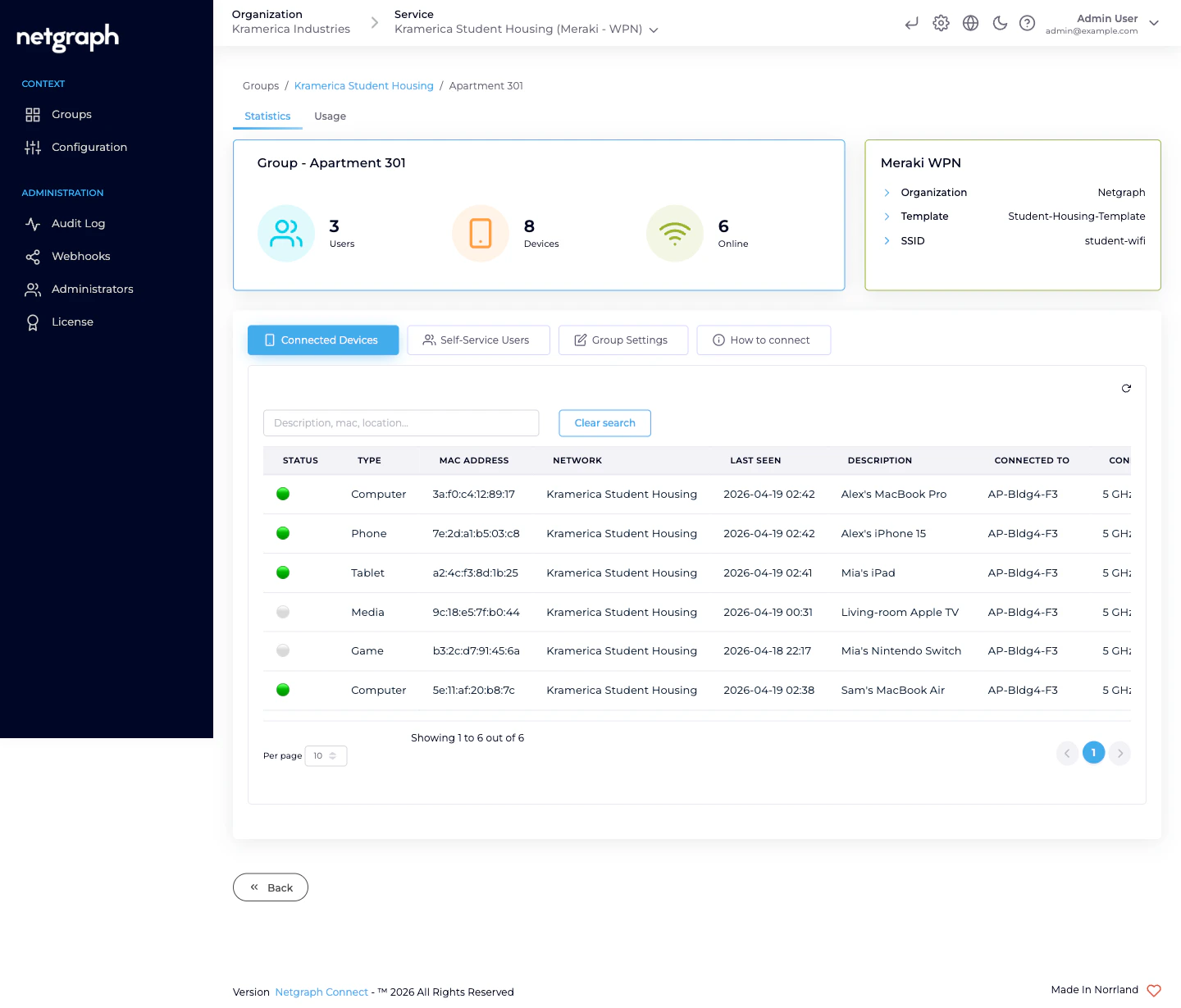
Each Wireless Personal Network carries:- A name — typically the unit identifier (Apartment 301, Room 4, Suite B). This is what the Group Administrator sees as the title of their bubble.
- A Pre-Shared Key — one value, 8–63 characters, shared by everyone in the unit. Auto-generated on create; can be rotated by the Group Administrator (Self-Service) or an admin (Admin Dashboard) at any time.
- A Meraki Identity PSK — one per associated Meraki network. The platform writes it on your Meraki dashboard behind the scenes.
- A Meraki Network Access Policy — either unique to this WPN or shared with every other WPN in the Context, depending on your Group Policy Strategy.
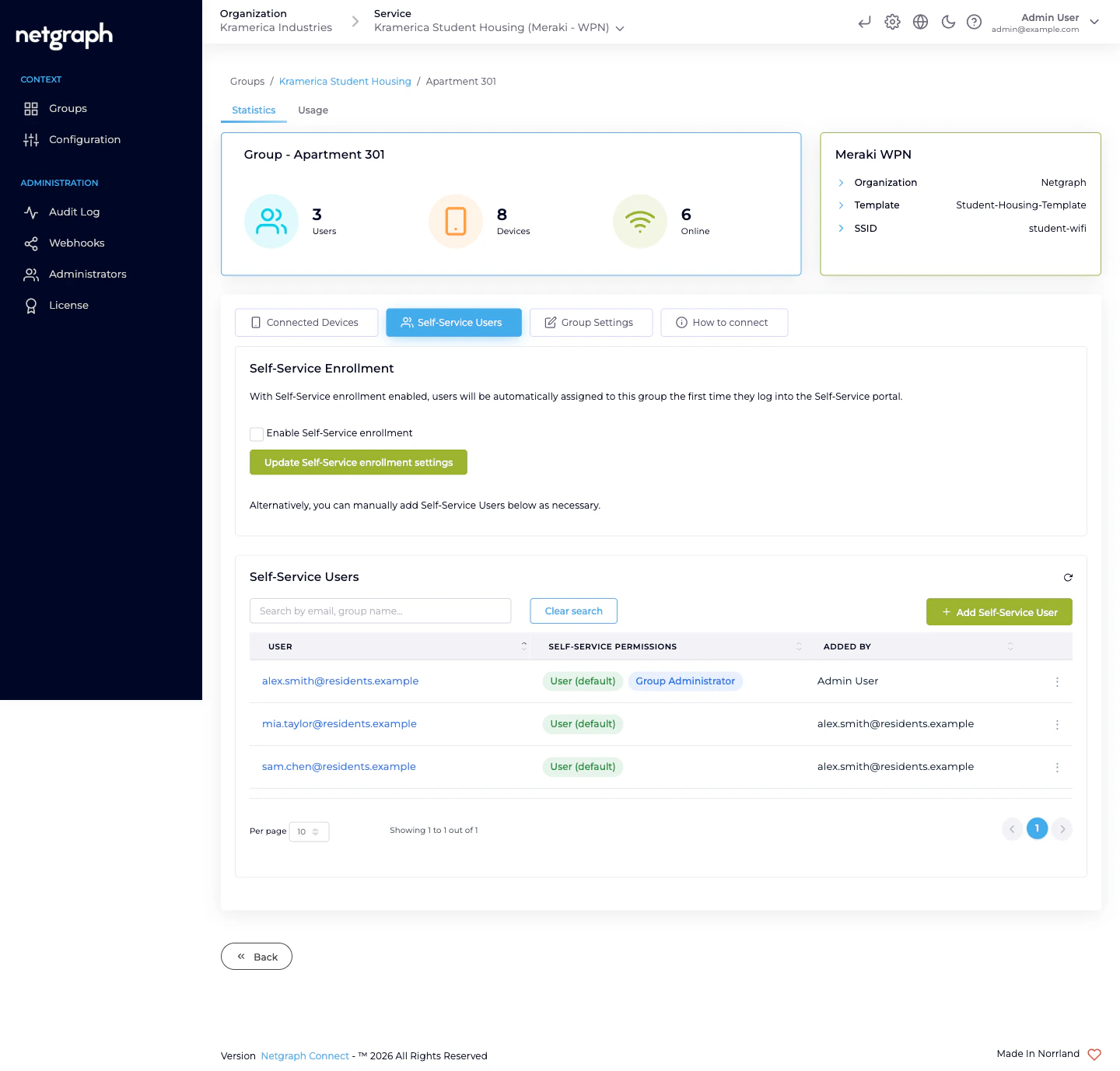
- Self-Service Users — the residents who share the PSK. Each has either the User (default) permission (view-only) or User (default) + Group Administrator (manage key and roommates).
- Connected devices — read continuously from the Meraki dashboard: a row per client joined with this WPN’s key.
The two Self-Service permission levels
Every member of a Wireless Personal Network has User (default). It’s always on and can’t be removed. On top of that, any member can also hold Group Administrator.| Permission | What they can do |
|---|---|
| User (default) | See the SSID, reveal the Pre-Shared Key, scan the QR code. |
| Group Administrator | All of the above, plus rotate the Pre-Shared Key, see every device connected to the WPN, and add / update / revoke other Self-Service Users in the WPN. |
How the Group Administrator uses it day-to-day
From the Self-Service portal they can:- Share the key — scan the QR code, copy the PSK, or show both to a roommate on their phone.
- Rotate the key — if it’s leaked, if a roommate moves out, if a device was lost. The platform re-programs the Meraki Identity PSK; every device currently joined has to re-enter the new key.
- See who’s connected — the list updates as devices join and leave. Good for spotting “who joined my Wi-Fi that shouldn’t have” moments.
- Invite another Self-Service User — for a new roommate, or to add a second Group Administrator for redundancy.
- Revoke a Self-Service User — when the roommate moves out.
What’s NOT a Wireless Personal Network
- Not a per-device key. A WPN’s PSK is shared by everyone in the unit. If you need per-device identity on Cisco networks — for IoT fleets where every device class needs its own key — use EntryPoint’s iPSK for Cisco Networks instead.
- Not an 802.1X network. No certificate, no identity provider, no RADIUS. It’s a pre-shared key model with per-unit scoping.
- Not isolated forever. A device inside a WPN can reach its default gateway (to get to the internet and to the Meraki dashboard’s walled-garden). It cannot reach devices inside other WPNs on the same SSID — that’s the L2-isolation guarantee.
Related
Self-Service portal
What the Group Administrator sees.
Managing WPNs
Create single, batch-create, rename, rotate, remove.
Managing Self-Service Users
Invite, promote, revoke.
Meraki connection
The integration underneath.